Posts

Sysprep was not able to validate your Windows installation. Review the log file at %WINDIR%\System32\Panther\setupact.log for details. After resolving the issue, use Sysprep to validate your installation again.

Image
When trying to sysprep Windows 10 you get the error Sysprep was not able to validate your Windows installation. Review the log file at %WINDIR%\System32\Panther\setupact.log for details. After resolving the issue, use Sysprep to validate your installation again. Check the log file, and see if you have a package installed that's blocking sysprep. "2020-02-25 00:01:27, Error                 SYSPRP Package Microsoft.LanguageExperiencePacken-GB_18362.14.45.0_neutral__8wekyb3d8bbwe was installed for a user, but not provisioned for all users. This package will not function properly in the sysprep image." Determine the name of the package Get-AppxPackage -AllUsers | SELECT PackageFullName, Name Remove the package Get-AppxPackage -AllUsers "Microsoft.LanguageExperiencePacken-GB" |Remove-AppXPackage -AllUsers Run sysprep again

Outlook blocked access to the following potentially unsafe attachments: filename

Image
When you receive an email outlook may block the attachment based on the file extension. The problem is Outlook doesn't give you the ability to override the block if you know the attachments are safe. To resolve the issue navigate to the following registry key, changing the version number if required and add the specified key HKEY_CURRENT_USER\Software\Microsoft\Office\ 16.0 \Outlook\Security Level1Remove REG_SZ Put the file extensions separated by a semicolon and restart Outlook For more information see the Microsoft support page https://support.microsoft.com/en-us/help/829982/outlook-blocked-access-to-the-following-potentially-unsafe-attachments

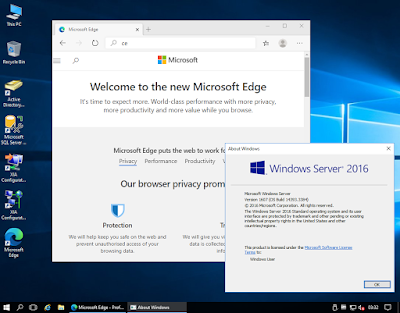
Install Microsoft Edge Browser on Windows Server 2016 and Windows Server 2019.

Image
There has been a lot of discussion around installing the Microsoft Edge web browser on Windows Server operating systems such 2016 and Windows Server 2019. The problem has been that as described by Microsoft as the following The Long-Term Servicing Branch (LTSB) versions of Windows, including Windows Server 2016, don't include Microsoft Edge or many other Universal Windows Platform (UWP) apps. These apps and their services are frequently updated with new functionality, and can't be supported on systems running the LTSB operating systems. For customers who require the LTSB for specialized devices, we recommend using Internet Explorer 11. This has left people stuck on the server operating systems using outdated Internet Explorer browsers, or installing a 3rd party browser such as Chrome. However, with the new version of Microsoft Edge you can now install the browser on Server operating systems. https://support.microsoft.com/en-us/help/4501095 Here is the offline ins...

When AirBnb tells you hosts can evict you because you've made a complaint

Image
We recently rented a property in Perth, Australia which the host has said was " a quiet street all professional occupants" unfortunately the property is in a very obnoxious area and the build quality of the property is poor with thin single paned windows. It is impossible to read, relax, or sleep when the neighbours are like this. Turn the volume up to maximum and this is a reasonable approximation of what it was like. In addition the property had a damaged storm blind which was smashing against the window which we had to get someone to tie up. Once that was sorted different neighbours were having a screaming match outside of their property and I was forced to go and confront them, they were so drunk they didn't even realise who was shouting at them. Two nights later a different property again had a party screaming how they were going to "annoy all of the neighbours". Turn the volume up to maximum and this is a reasonable approximation of what it...

How to uninstall Spotify on Windows 10 (Spotify not in Programs and Features)

Image
If you follow the instructions to uninstall Spotify for Windows 10 you might be sent to Programs and Features, however you find that Spotify is not there.   This is because the application is installed using the new Windows 10 method. Click Start Click the Gear icon Click Apps  Then you can find Spotify and click uninstall

Google Chrome shows an entirely black screen when opened.

Image
When you open Google Chrome it shows an entirely blank, black screen, you can click on the menu and they appear. This issue can occur after changing your video card drivers for your GPU. To resolve this Close Google Chrome Goto the following directory %userprofile%\AppData\Local\Google\Chrome\User Data\ShaderCache Rename the folder GPUCache to GPUCache.old Restart Google Chrome. Fixed without losing any of your settings you'd get from a reinstall.

ASP.NET localized ASPX page titles revert to page URL after postback

You may have an ASPX where you have used a resource file to set the title in the ASPX markup, all looks good viewing the page until you click something on the page which causes a postback. < title >     < asp : Literal ID ="titleLiteral" runat ="server" EnableViewState ="false" Text =" <% $ Resources:EventLog, EventLogTitle %> " /> </ title > The page title then reverts to the URL of the page. Strange. The solution is to put all of the markup on a single line and then it works < title >< asp : Literal ID ="titleLiteral" runat ="server" EnableViewState ="false" Text =" <% $ Resources:EventLog, EventLogTitle %> " /></ title > Not sure why this is the case, but it's an easy fix at least.