Posts

Query the CMDB with PowerShell

Image
With XIA Configuration Server version 6.2 we're now directly supporting the use of PowerShell to query the CMDB. The following very simple example generates a PDF document for an item and opens the file in the default PDF document viewer. In the example the PDF is generated for the item with ID 1031, however any valid item ID may be used.  The output is returned from the server as a byte[] array, this is then saved to the filesystem before opening. In the example the file is saved to "c:\temp\sample.pdf", however any valid path may be used.  Code Sample Write-Host "Getting PDF data..." $filename = "c:\temp\sample.pdf" $binaryData = $xia . GET_PDFOutputBasic( 1031 ) [ IO.File ]:: WriteAllBytes( $filename , $binaryData ) [ System.Diagnostics.Process ]:: Start( $filename )  Output For more information see the PowerShell page of our web site http://www.centrel-solutions.com/XIAConfiguration/features.aspx?feature=PowerS...

Viewstate of a DropDownList is lost on postback using ComponentArt Dialog Control

As long time users of ComponentArt ASP.NET controls we're well aware of their shortcomings and the company's lack of enthusiasm about fixing bugs. We've recently had a problem with populating data into a dropdown list that's inside a ComponentArt Dialog Control on the initial load of a page. The dropdown list is populated but on subsequent postbacks the information is lost and viewstate errors may be seen. Here is the forum page where there are a lot of complaints but no viable solution. http://www.componentart.com/community/forums/t/37374.aspx This is really not acceptable because this is the kind of problem that really stops your development in its tracks. We do however have a simple solution. The problem seems to be related to the control lifecycle internal to the ComponentArt controls. You can resolve the issue by populating the dropdown list (or other problematic control) by overriding a different method. OnLoad - fail OnInit - fail OnPreRender - work...

A "Generic failure" error is seen accessing DNS WMI classes such as "MicrosoftDNS_Zone"

Image
You may see a " Generic failure " error when trying to access DNS WMI classes in the root\MicrosoftDNS namespace such as "MicrosoftDNS_Zone". In the XIA Configuration Client the error displayed is for example The DNS service agent encountered an exception when 'Reading forward lookup zones'. Generic failure. Cause This problem can be caused by a problem with the DNS WMI provider.  Resolution Ensure you have a full backup of the server Open a command prompt as an Administrator  Enter the following command changing the drive letter and path if required C:\Windows\System32\wbem\mofcomp C:\Windows\System32\wbem\dnsprov.mof Scan the DNS service again For more information on the mofcomp utility please see the following Microsoft web page. http://msdn.microsoft.com/en-us/library/aa392389(v=vs.85).aspx

Setting the Windows 8.1 or Server 2012 titlebar color using the registry

Image
I've recently had a problem whereby I needed to set the title bar colour in Windows 8.1 (or Windows Server 2012) to a specific colour so that I could take screenshots for our technical documentation. To ensure consistency we wanted to keep the titlebars the same colour in all our documentation. The problem here is I can get the RGB of the colour I need however you're not allowed to key a colour in using the new interface. Instead you're are left working some kind of colour wizardry moving the sliders around for several minutes. After a small amount of messing around I found the following registry keys in combination allow you to enter the RGB in hex format after the mystical d9  (not sure what this symbolises). [HKEY_CURRENT_USER\Software\Microsoft\Windows\DWM] "ColorizationColor"=dword:d9 6badf6 "ColorizationColorBalance"=dword:00000064 "ColorizationAfterglow"=dword:d9000000 "ColorizationAfterglowBalance"=dword:00000...

Writing Chinese or other extended characters to CSV using C#.NET is garbled when viewed in Microsoft Excel

Image
We've recently had a problem when writing Chinese or other extended characters to CSV using C#.NET is garbled when viewed in Microsoft Excel. Firstly as you would expect if you use the standard ASCII encoding when using File.WriteAllText() method the Chinese characters are substituted for ???? You can work around this by overloading with the encoding parameter and using UTF8 encoding. File.WriteAllText(Filename, "Some,Sample,这是一些示例文本 这是一些示例文本 这是一些示例文本, Data", Encoding.UTF8); NOTE: if you use Unicode encoding the following may happen where Excel does not recognize the commas as delimiters. If you're trying to write the CSV data to binary you will have another problem whereby the Chinese characters are garbled. To resolve this issue you should use the GetPreamble() method to write the encoding to the start of the file. The file will now open correctly in Excel using the following sample code. private void WriteCSV() {     byte[] CSVBinaryDa...

ASP.NET checkbox and radio button vertical text alignment problems

Image
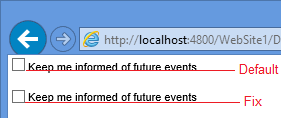
Within ASP.NET you might find when you add a control to the page that the text does not line up correctly with the checkbox or radio button with the text "falling off" the bottom of the checkbox. This looks rather awkward. I've seen several fixes that involve wrapping the checkbox in a DIV which seems over the top and you'll end up with stray DIVs defined all over your ASP.NET project. Instead create a new class AlignedControl  .AlignedControl Label  {      position: relative;      top: -2px;  } Assign the CSS class using the CssClass property. This will cause the checkbox and it's corresponding label to be wrapped in a SPAN which allows everything to work correctly <asp:CheckBox ID="chkKeepInformed" CssClass="AlignedControl" runat="server" Text="Keep me informed of future events" /> This is the difference with and without the fix. The same applies to radio buttons. Want to document your SQL se...

Software Lifecycle - detecting products that are out of support

With XIA Configuration Server v6.1 we've updated the software package items to include software lifecycle information. This allows users to configure matching information and manufacturer end of life support dates to software packages. This information can then be used to detect systems that have software packages deployed that are out of support or nearing their end of life or entering an extended support period. For more information see the software package page of our web site http://www.centrel-solutions.com/XIAConfiguration/Capabilities.aspx?capability=SoftwarePackage