Posts

Setting the Windows 8.1 or Server 2012 titlebar color using the registry

Image
I've recently had a problem whereby I needed to set the title bar colour in Windows 8.1 (or Windows Server 2012) to a specific colour so that I could take screenshots for our technical documentation. To ensure consistency we wanted to keep the titlebars the same colour in all our documentation. The problem here is I can get the RGB of the colour I need however you're not allowed to key a colour in using the new interface. Instead you're are left working some kind of colour wizardry moving the sliders around for several minutes. After a small amount of messing around I found the following registry keys in combination allow you to enter the RGB in hex format after the mystical d9  (not sure what this symbolises). [HKEY_CURRENT_USER\Software\Microsoft\Windows\DWM] "ColorizationColor"=dword:d9 6badf6 "ColorizationColorBalance"=dword:00000064 "ColorizationAfterglow"=dword:d9000000 "ColorizationAfterglowBalance"=dword:00000...

Writing Chinese or other extended characters to CSV using C#.NET is garbled when viewed in Microsoft Excel

Image
We've recently had a problem when writing Chinese or other extended characters to CSV using C#.NET is garbled when viewed in Microsoft Excel. Firstly as you would expect if you use the standard ASCII encoding when using File.WriteAllText() method the Chinese characters are substituted for ???? You can work around this by overloading with the encoding parameter and using UTF8 encoding. File.WriteAllText(Filename, "Some,Sample,这是一些示例文本 这是一些示例文本 这是一些示例文本, Data", Encoding.UTF8); NOTE: if you use Unicode encoding the following may happen where Excel does not recognize the commas as delimiters. If you're trying to write the CSV data to binary you will have another problem whereby the Chinese characters are garbled. To resolve this issue you should use the GetPreamble() method to write the encoding to the start of the file. The file will now open correctly in Excel using the following sample code. private void WriteCSV() {     byte[] CSVBinaryDa...

ASP.NET checkbox and radio button vertical text alignment problems

Image
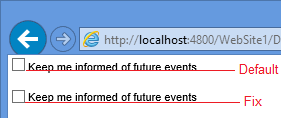
Within ASP.NET you might find when you add a control to the page that the text does not line up correctly with the checkbox or radio button with the text "falling off" the bottom of the checkbox. This looks rather awkward. I've seen several fixes that involve wrapping the checkbox in a DIV which seems over the top and you'll end up with stray DIVs defined all over your ASP.NET project. Instead create a new class AlignedControl  .AlignedControl Label  {      position: relative;      top: -2px;  } Assign the CSS class using the CssClass property. This will cause the checkbox and it's corresponding label to be wrapped in a SPAN which allows everything to work correctly <asp:CheckBox ID="chkKeepInformed" CssClass="AlignedControl" runat="server" Text="Keep me informed of future events" /> This is the difference with and without the fix. The same applies to radio buttons. Want to document your SQL se...

Software Lifecycle - detecting products that are out of support

With XIA Configuration Server v6.1 we've updated the software package items to include software lifecycle information. This allows users to configure matching information and manufacturer end of life support dates to software packages. This information can then be used to detect systems that have software packages deployed that are out of support or nearing their end of life or entering an extended support period. For more information see the software package page of our web site http://www.centrel-solutions.com/XIAConfiguration/Capabilities.aspx?capability=SoftwarePackage

Automatically install the IIS Management Scripts and Tools role feature (Web-Scripting-Tools).

Image
Starting with Windows Server 2008 Microsoft made it so that you could not communicate with IIS servers using WMI by default, instead you must install the IIS Management Scripts and Tools role feature ( Web-Scripting-Tools ). This can be done using the one of the following methods Using PowerShell locally with the command Import-Module ServerManager Add-WindowsFeature Web-Scripting-Tools Using PowerShell remoting (assuming that PowerShell 2 is installed and that remoting is enabled) Using servermanagercmd on Windows 2008 and Windows 2008 R2 servermanagercmd.exe -install Web-Scripting-Tools Using the Server Manager user interface As this role feature is a requirement for XIA Configuration to be able to document and audit your IIS servers we've added a new tool to XIA Configuration Server v6.1 The tool allows you to enter the names of the local or remote servers on which to install the role service. This does not  require PowerShell 2 or remoting as it uses a remote...

When creating an Active Directory account you see the error "The name provided is not a properly formed account name." or " A device attached to the system is not functioning."

When creating an Active Directory account you see the error "The name provided is not a properly formed account name." or " A device attached to the system is not functioning." This can be caused by the SAM account name value that is being entered for the user which must only contain valid characters but must also be 20 characters long or less. For more information see the following Microsoft article. http://msdn.microsoft.com/en-us/library/ms679635(v=vs.85).aspx We've updated XIA Automation Server in version 2.2 to provide a more informative error message than the one provided by Windows Creation of the account failed. The SAM account name (user logon name pre-Windows 2000) value ' accountname ' exceeds the maximum 20 characters enforced by Windows. Automate Active Directory user account creation  with XIA Automation Server

XIA Configuration Server v6 and Microsoft SystemCenter Configuration Manager (SCCM) 2012 R2

We've been asked recently about whether XIA Configuration Server should be used alongside or instead of System Center Configuration Manager (SCCM) 2012 R2. XIA Configuration provides a much greater depth of information and inventory capabilities than SCCM, however SCCM is designed to provide other functionality such as software deployment, operating system deployment and endpoint security as well as hardware and software inventory. XIA Configuration Server can be used alongside SCCM and can be used without the need to install additional agents on the target machines. For more information see the following page http://www.centrel-solutions.com/XIAConfiguration/features.aspx?feature=SystemCenter