Posts

Active Directory DNS zone replication scope (for example All Servers in the Domain) cannot be read or set with WMI

Image
When updating our DNS service audit tool  we were looking for a way to read the replication scope for an Active Directory integrated zone - for example "All Servers in the Domain" and found that this information isn't available in the standard DNS WMI class  MicrosoftDNS_Zone . This is unfortunately another thing that Microsoft have not exposed on their WMI classes. There is some good news however - this information is now exposed on Microsoft's new Management Infrastructure (MI) WMI classes - see the property ReplicationScope   DnsServerPrimaryZone This information will be audited and available for DNS servers running Windows Server 2012 and above in XIA Configuration Server v6.

Activate Windows Server 2012 R2 with license key after login

Image
After you've installed Windows Server 2012 R2 if you skip entering the license key you can then run this again later either by running the msoobe.exe command as follows %systemroot%\system32\oobe\msoobe.exe /a This displays the following settings screen Or alternatively Start > Right click My Computer and select P roperties From this screen select Change product key Please see our Network Audit Tool  XIA Configuration Server. Dave

Group Policy Management Console error "Invalid Pointer"

Image
When using the Group Policy management console you may see the error Invalid Pointer  or The data is invalid  as you expand the domain. This can be caused if there is an invalid gPLink  value on one of the organizational units. As you can see here the distinguished name has been modified placing a "f" character before the LDAP:// prefix. To resolve the error you need to locate the faulty gPLink and correct the distinguished name value. You can either look at the organizational units or scan the domain with our Active Directory audit tool  can help locate the faulty link. http://www.centrel-solutions.com/XIAConfiguration/Capabilities.aspx?capability=ActiveDirectory

Determine if the Active Directory recycle bin is installed

Image
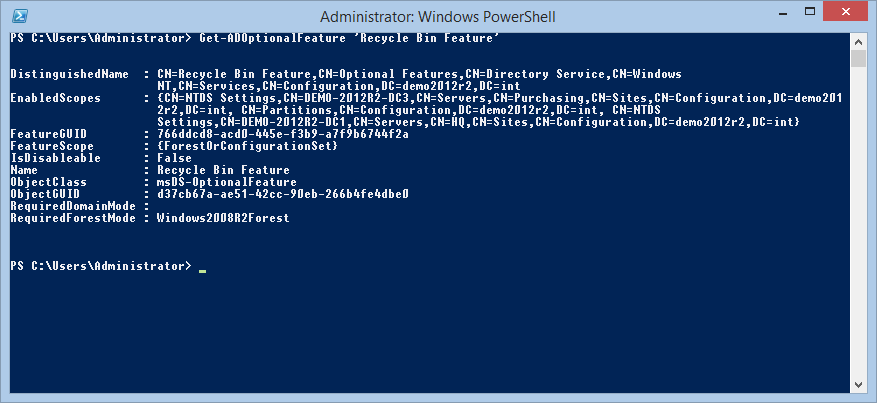
Be warned if you're trying to find out whether the Active Directory recycle bin feature is installed in the forest. Many documents suggest that you read the msDS-EnabledFeature attribute of the following location of Active Directory CN=Partitions,CN=Configuration,DC= somedomain ,DC= int However if you are not an Enterprise Admin or Domain Admin in the forest root domain you'll see the setting displayed as <Not Set> even if the Recycle Bin is installed. This is misleading as <Not Set> is what is displayed if the Recycle Bin is not installed. Running the following PowerShell command does work correctly Get-ADOptionalFeature 'Recycle Bin Feature' This is because the tool looks at the servers NTDS settings, where another msDS-EnabledFeature attribute can be found. This attribute is populated as each domain controller is informed that the optional feature has been installed in the forest. A permissions friendly LDAP query is as fo...

Monitor / trace live LDAP queries against Active Directory

Image
I have recently been trying to trace all LDAP queries executed against Active Directory and found it difficult to find any Microsoft tools to perform this task. The ADInsight tool seems to be deprecated and has several issues including running on virtual machines. The simplest solution I found was here. http://social.technet.microsoft.com/Forums/windowsserver/en-US/c1677d2b-7e29-4382-9bea-84f3399d37e3/ldap-connectionsqueries-logging?forum=winserverDS By setting the following registry entries the LDAP queries are logged to the Directory Services  event log HKEY_LOCAL_MACHINE\SYSTEM\CurrentControlSet\Services\NTDS\Diagnostic 15 Field Engineering DWORD = 5 HKEY_LOCAL_MACHINE\SYSTEM\CurrentControlSet\Services\NTDS\Parameters Expensive Search Results Threshold DWORD = 1 Inefficient Search Results Threshold DWORD = 1

Cluster Automatic Updates hangs on installation - "Adding CAU clustered role with self-updating enabled"

Image
When installing Cluster Automatic Updates on Windows Server 2012 or above you may notice the setup hangs on installation - "Adding CAU clustered role with self-updating enabled" is displayed in the user interface. More Information Checking the system event log may show the following error The Cluster service failed to bring clustered service or application ' name ' completely online or offline. One or more resources may be in a failed state. This may impact the availability of the clustered service or application. Resolution Cancel the installation, create a computer account in Active Directory using Active Directory Users and Computers and then restart the wizard. Select the prestaged computer option and enter the name of the computer account you created manually. For more information about our software XIA Configuration Server and it's ability to audit Microsoft Failover Server configuration see the following article  Automated Fa...

VMware Workstation "Failed to lock the main memory file"

When attempting to start a virtual machine on VMware Workstation you may see the error"Failed to lock the main memory file" and you are prompted whether to discard or preserve the data. It's worth clicking preserve and trying to start the virtual machine again at this point. If you still get the error try renaming the lock file found in the virtual machine's location on the file system. The file will have a .vmem.lck extension for example. DEMO-CLUS2K8-01-2127748b .vmem.lck And then the virtual machine should start again OK. Document your VMware vCenter Configuration